Live for Windows 10 & 11

You just took a screenshot. Now where is it?

InTray catches every screenshot, download and photo from your phone in one floating tray. Drag it straight into Claude, Outlook or Teams as a real file. No hunting through File Explorer.

Then keep it for £14.99 one-time - buy once, free updates for 2.x. No subscription.

Also on the Microsoft Store

Screenshots Downloads Phone to PC
The real app on Windows - snip it, drag it, Beam it from your phone. No File Explorer.

Why InTray

The file hunt ends here.

Ten steps became one drag. Here's the trade.

the ritual

  • Your snip saves to a timestamped file in a folder you now have to go and find.
  • Alt-Tab, File Explorer, sort by date, squint at thumbnails.
  • The download you need is buried under 60 older files.
  • Prompting Claude or ChatGPT? Capture, hunt, upload, repeat, every single iteration.
  • A photo on your phone? Email it to yourself, open the email, save the attachment, find it.

one drag

  • Every screenshot, download and phone photo lands in one floating strip the moment it arrives.
  • Drag it into any app as a real file. Outlook, Teams, VS Code, a browser upload.
  • Click to copy. Pin the shots you keep reusing.
  • Phone photos arrive over your own Wi-Fi. Scan a QR code, pick, done.

Try it live

Don't take our word for it. Snip this screen.

A working simulation of InTray, right here in your browser. Snip the chart, watch it land in the tray, then drag it into the email - it works the way the real app does on your desktop.

  1. 2 Watch the tray
  2. 3 Drag it into the email
Click "Take a snip", then drag over the chart
Search
InTray.
Snips land here

On your desktop you'd press Win+Shift+S on Windows 11, or Win+PrtScn on Windows 10 - InTray works with the snipping tool you already use. Single-click a thumbnail to copy it; right-click for more. Best with a mouse or touch.

The real app does this for every screenshot and download on your PC.

Try InTray free for 7 days No card, just an email

Who it's for

If you screenshot all day, this is for you.

AI builders

You screenshot into Claude, ChatGPT or Cursor all day: the error, the broken UI, the design to match. InTray keeps every shot one drag away, lets you reuse the same one across chats, and pins the reference you keep coming back to. It even catches the images the AI hands back, straight from Downloads.

Developers

Bug reports, PR screenshots, Jira tickets. Snip it and drag it into the ticket or the editor as a real file - no detour through File Explorer, no breaking flow.

Support & ops

Capturing a screen to explain a fix, attach to a ticket, or drop into Teams. Every snip is one drag from exactly where it needs to go.

Everyday Windows

Someone sent you a file? It appears in the same strip the moment it finishes downloading. The whiteboard photo on your phone, the receipt, the signed form? Beam it across and it lands there too.

Features

Small app. Sharp edges filed off.

Everything below ships in InTray today - nothing here is roadmap.

Native drag-and-drop

Thumbnails drag as real OS-level files, so the receiving app gets a genuine file drop - not a clipboard paste that half your tools reject. Works with VS Code, Outlook, Teams, Slack and browser upload fields.

Three sources, one tray

Screenshots and Downloads are watched at the same time, each with its own badge colour, and files sent from your phone with Beam land in the same strip. Installers, archives and in-progress downloads are filtered out automatically - only the files you'd actually reach for.

Summon it from anywhere

Press Ctrl+Shift+Space to bring the tray up - or send it away - from inside any app, without reaching for the mouse. It shows without taking focus, so it can't swallow a keystroke while you're typing.

Private by architecture

InTray has no cloud sync, no account and no telemetry. Your screenshots never leave your machine - there is simply no code path for them to - and phone transfers stay on your own Wi-Fi. The only things InTray ever sends anywhere are a licence check to Lemon Squeezy, at most once every 7 days and never during the free trial, and an update check when you ask for one. Separately, Windows itself checks getintray.com for new versions, as it does for any app it installed.

Also in the box

  • Click to copy - images as image data, files as real file objects
  • Pin shots you keep reaching for - they stay put while new ones flow in
  • Auto-hide on your schedule - 30 seconds, 1, 2 minutes, or never
  • Right-click: open, copy path, or reveal in Explorer
  • Watch any folder you like, not just the defaults
  • Moves freely across every monitor, snaps home on a double-click
  • Theme-aware tray icon - matches your light or dark taskbar, live
  • Full keyboard and screen-reader support - arrow keys, Enter to copy, Ctrl+P to pin
  • EV code-signed and installed by Windows itself - verified publisher, updates in place
Beam Included with InTray

Phone to PC. No cable, no cloud, no app.

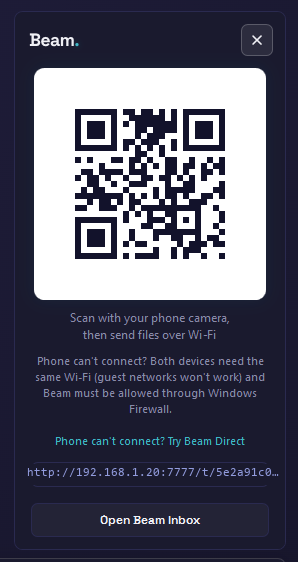
Tap the phone button on the strip and a QR code appears. Scan it with your phone's camera, pick your photos or files in the page that opens, and they land in the strip beside your screenshots, ready to drag, and in a Beam Inbox folder on your PC. It all happens over your own Wi-Fi: no cloud, no account, no cable, and nothing to install on the phone. iPhone or Android.

Part of every InTray licence and the free trial. Phone and PC on the same Wi-Fi (or Beam Direct, where your PC can host its own connection). Up to 10 files at a time, 1 GB each.

InTray's Beam popup: a QR code to scan from a phone, the PC's address beneath it, and the connection status

Seen enough? Try all of it, free.

Every feature for 7 days, no card. Then £14.99 one-time - buy once, free updates for 2.x. No subscription.

3sources: screenshots, downloads, phone
0accounts, clouds or subscriptions
1payment - buy once, own it
2.xupdates included free

Pricing

Pay once. Own it.

Start with a free 7-day trial, no card, just an email. Keep InTray with a one-time licence: buy once and own it for good, with free updates for every 2.x release. Every tier has every feature; the only difference is how many devices your licence covers.

Standard £14.99

One-time. 1 device. Buy once, free updates for 2.x. No subscription.

Buy Standard
Personal £22.99

One-time. 2 devices, desktop and laptop, one licence. Buy once, free updates for 2.x. No subscription.

Buy Personal
Professional £29.99

One-time. 3 devices, for people whose whole desk runs on Windows. Buy once, free updates for 2.x. No subscription.

Buy Professional

Every tier includes

  • Floating screenshot tray - always one drag away
  • Downloads watcher - new downloads appear instantly
  • Beam - send files from your phone over your own Wi-Fi
  • Drag files into any app: Outlook, VS Code, Teams, Jira
  • Click to copy to clipboard
  • Auto-hide tray - zero screen clutter
  • EV code-signed - verified publisher shown by Windows
  • Free updates for every 2.x release
  • Every feature in every tier - no feature gates

Requires Windows 10 or 11 · Secure checkout via Lemon Squeezy · Instant delivery by email · Refund policy

Not sure yet? Start with the free 7-day trial - no card needed.

Prefer the Store? InTray is also on the Microsoft Store, and your licence works in either copy.

FAQ

Before you ask. Answered.

How does the free trial work?

Download InTray and use every feature for 7 days. No card needed, just an email address. There is nothing to cancel: if you do nothing, the trial simply ends.

Do I need to cancel the trial at the end?

No. The trial takes no payment details and nothing renews. If InTray is not for you, switch it off or uninstall it, or simply do nothing: the trial ends on its own and you will never be charged.

What happens when the trial ends?

Drag, copy and Beam switch off. Nothing is deleted: every file stays exactly where it was, and the strip keeps showing new ones. A one-time licence switches everything back on straight away, with no reinstall.

Is it really a one-time purchase?

Yes. Buy once and own it, with free updates for every 2.x release. There is no subscription and nothing that renews.

Which tier do I need?

Every tier has every feature. The only difference is devices: Standard covers 1, Personal covers 2, Professional covers 3.

Where do my screenshots go?

Nowhere. InTray has no cloud sync, no account and no telemetry. Your files never leave your machine, and files you send from your phone travel over your own Wi-Fi, never through a server. The only things InTray ever sends anywhere are a licence check to Lemon Squeezy, at most once every 7 days and never during the free trial, and an update check when you ask for one. Separately, Windows itself checks getintray.com for new versions, as it does for any app it installed.

Will Windows warn me when I install it?

InTray installs through Windows' own App Installer rather than a downloaded .exe, so the usual "Windows protected your PC" screen does not apply. You open a small InTray.appinstaller file, Windows shows "Install InTray? Publisher: BIT-SOFT TECHNOLOGY LTD" - our EV-verified name - and installs it, then keeps it up to date. If your browser asks you to confirm keeping a newly released file, choose Keep: that is the browser's download check, not Windows. On a work PC, your IT team may need to approve new apps.

Does it work with the snipping tool I already use?

Yes. InTray watches the folder your screenshots save to. On Windows 11, Win+Shift+S and the Snipping Tool save automatically, so your existing habit just works. On Windows 10, Win+Shift+S only copies to the clipboard and never saves a file, so press Win+PrtScn instead (it saves to Pictures\Screenshots) or save from Snip & Sketch. If Windows is saving somewhere unexpected, InTray tells you exactly where to point it.

How do I get files from my phone?

With Beam, which is part of InTray. Turn it on from the phone button on the strip, scan the QR code with your phone's camera, pick your files in the page that opens, and they land in the strip. Nothing to install on the phone, and it works with iPhone and Android. Your phone and PC need to be on the same Wi-Fi; if your network keeps them apart, Beam Direct lets the PC host its own connection on PCs that support it. Up to 10 files at a time, 1 GB each. The first time, Windows Firewall may need your permission, which on a work PC means your IT team.

Wasn't this called Clip?

Yes. InTray was called Clip until September 2026, when it was rebuilt as a native Windows app and Beam was added. If you bought Clip, email support@bit-soft.co.uk and we'll sort out your InTray licence.

Get InTray

Stop hunting. Start dragging.

Download free. Every feature, Beam included, for 7 days, then £14.99 one-time to keep it. No subscription.

Prefer the Store? It's the same app, and your licence works in either copy.

Get InTray from the Microsoft Store

Press Esc or click outside to close